Android接入实时美颜

概述

相亲项目从3月份上线至今,不管从DAU,UV,留存还是Roi,Arpu等多个方面都有了极速的增长。但是在使用过程中,同样也遇到了一些比较重要的问题。比如美颜问题,在项目初始,我们使用了Agora RTC SDK独有的美颜方案,可是我们的用户一直反馈现有的美颜效果很不好,美颜效果不能调节等问题。从而我们决定接入第三方相芯美颜sdk,来满足我们项目在美颜方面的缺陷。

实现方案


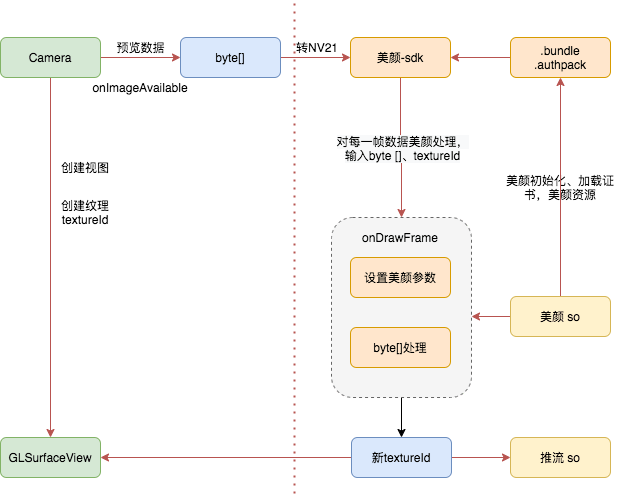
通过之上方案图,我们可以看出,整个的实现方案就是在相机数据采集后,对数据进行实时美颜处理,处理完成后,及时渲染展示。同时,我们会把渲染后对NV21数据推流到CDN服务器。原理很简单,主要是美颜so的实现方法是关键知识点,这次我们不做讲解,只描述下接入的方法和业务逻辑。

初始化

1
2
3
4
5
fuSetup(context, path, authpack.A());
byte[] buffer = FileUtils.readFile(context, bundlePath);
if (buffer != null) {
faceunity.fuLoadAIModelFromPackage(buffer, type);
}

转化

1
2
3
4
5
6
7
8
9
10
11
12
13
14
15
16
17
/**
*
* @param img NV21数据
* @param tex 纹理ID
* @param w
* @param h
* @return
*/
public int onDrawFrame(byte[] img, int tex, int w, int h) {
if (tex <= 0 || img == null || w <= 0 || h <= 0) {
Log.e(TAG, "onDrawFrame data null");
return 0;
}
...
int fuTex = faceunity.fuDualInputToTexture(img, tex, flags, w, h, mFrameId++, mItemsArray);
...
}

其中 img 和 tex纹理是我们传入的原始数据,mItemsArray 则是需要用到的美颜效果数组,当该方法返回时,得到的数据便是经过美颜处理的数据,该数据会写回到我们传入的 img 数组中,而返回的 fuTex 则是经过美颜处理的新的纹理标识。

推流

美颜处理后,推举到服务器。

1
2
3
mConsumer.consumeTextureFrame(data.mEffectTextureId,
MediaIO.PixelFormat.TEXTURE_2D.intValue(), needsFixWidthAndHeight ? data.videoHeight : data.videoWidth,
needsFixWidthAndHeight ? data.videoWidth : data.videoHeight, 0, data.mTimeStamp, data.mTexMatrix);

美颜调整

而相应的美颜效果可以通过如下方法进行调节(均在 faceunity 当中),由于我们在对每一帧的时候进行了美颜参数设置,所以我们的美颜设置可以随时的调节并生效。

1
2
3
4
5
faceunity.fuItemSetParam(itemBeauty, BeautificationParams.IS_BEAUTY_ON, 1.0);
// filter_name 滤镜名称
faceunity.fuItemSetParam(itemBeauty, BeautificationParams.FILTER_NAME, mFilterName);
// filter_level 滤镜强度 范围 0~1 SDK 默认为 1
faceunity.fuItemSetParam(itemBeauty, BeautificationParams.FILTER_LEVEL, mFilterLevel);

相亲接入

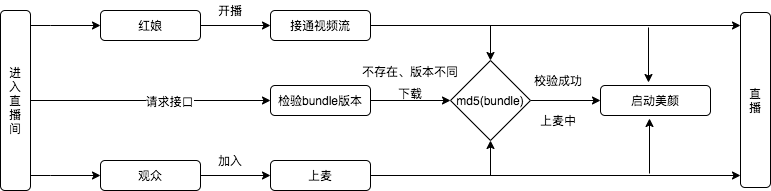
关键代码如下:直接看注释即可。这里需要注意的是,美颜的sdk,在初始化的时候,加载了证书信息和ai的bundle文件,这个很容易产生误导,实际上,ai的bundle并不是必须在这里进行加载,在直播的过程中也可以再加载生效。所以我把美颜的initFuRender中的ai bundle拆分了出来。这样我们可以提前加载证书,任何时候加载并开启美颜功能。

1
2
3
4
5
6
7
8
9
10
11
12
13
14
15
16
17
18
19
20
21
22
23
private fun startBroadcast(uid: Int, local: Boolean, type: Int, userInfo: LiveUserInfo) {
//创建SurfaceView,本地view=GLSurfaceView 远端view=SurfaceView
var surfaceView = getSurfaceView(uid,local)
//初始化美颜,以及设置参数
initFaceUnityParam(local, type, surfaceView)
//321倒计时直播开始
mVideoItemAnchor?.showLoading(local, surfaceView, type)
}
}
}

/**
* 美颜初始化,设置美颜参数
*/
private fun initFaceUnityParam(local: Boolean, type: Int,surfaceViewLocal: Surf
//初始化
faceunityManager?.initFuRender(this)
//设置view
faceunityManager?.setGLSurfaceView(surfaceViewLocal as GLSurfaceView)
//设置美颜参数
mVideoItemAnchor?.setFaceunity()
}
}

美颜的管理都在FaceunityManager中进行设置:代码如下:

1
2
3
4
5
6
7
8
9
10
11
12
13
14
15
16
17
18
19
20
21
22
23
24
25
26
27
28
29
30
31
32
33
34
35
36
37
38
39
40
41
42
43
44
45
46
47
48
49
50
51
52
53
54
55
56
57
58
59
60
61
62
class FaceunityManager {

//初始化美颜sdk,以及相关管理类
fun initFuRender(context: Context) {
// The settings of FURender may be slightly different,
FURenderer.initFURenderer(context)

}

//设计camera数据相关采集参数,宽,高,帧率,是否推流......
fun setFaceUnityParam(width: Int, height: Int) {
// set capture width
mVideoCaptureConfigInfo?.videoCaptureWidth = width
// set capture height
mVideoCaptureConfigInfo?.videoCaptureHeight = height
// set capture fps
mVideoCaptureConfigInfo?.videoCaptureFps = 30
// set capture camera
mVideoCaptureConfigInfo?.cameraFace = Constant.CAMERA_FACING_FRONT
// set agora consumer format
mVideoCaptureConfigInfo?.videoCaptureFormat = VideoCaptureConfigInfo.CaptureFormat.TEXTURE_2D
// set agora consumer type
......
}

/**
* 设置并开启美颜,当上麦倒计时,直接调用
*/
fun setBeauty() {
if (this.mGLSurfaceViewLocal == null) {
return
}
if (mVideoManager?.videoRender != null) {
return
}
isShowVideo = true
mVideoManager?.allocate(mVideoCaptureConfigInfo)
mVideoManager?.setRenderView(this.mGLSurfaceViewLocal)
startBundle()
mVideoManager?.attachConnectorToRender(mVideoSource)
mVideoManager?.startCapture()
}

/**
* 开启美颜,对bundle进行校验,校验成功,加载bundle,开启美颜功能
* 如果bundle下载成功后,也使用此方法开启美颜功能
*/
fun startBundle(fileName: String) {
val isVerity = isVerify(mFaceBundlePath, fileName + "_md5")
if (isVerity) {
mVideoManager?.runInRenderThread {
if (!mFUInit) {
mFURenderer?.onSurfaceCreated()
mFUInit = true
}
}
}
mVideoManager?.connectEffectHandler(mEffectHandler)
}
}

}